Link in Bio Generator
Create a personalized Link in Bio page with all your important links. Perfect for social media profiles like Instagram, TikTok, and more.
Configure your Smart Link page:
Customize Page Text:
Customize Blocks:
Links & Image Blocks:
Social Links:
🔗 Preview do Link in Bio
How to Create Your Personalized Link in Bio Page
Step 1: Choose Your URL (Slug)
Choose a unique slug to create a personalized URL that reflects your brand or identity — for example: https://code2scan.com/s/your-company-name.

Step 2: Add Links with Details
Add links to your website, products, services, blog, videos, or any content you want — with custom titles, icons, and optional images for each link. As you build your page, you can see a live preview on the right — so you know exactly how it will look!

Step 3: Add Social Media Links
Add links to your key social media profiles such as Instagram, TikTok, YouTube, Facebook, LinkedIn, and many more — to drive engagement and grow your audience. The preview updates automatically as you add each link.

Step 4: Customize and Publish
Customize the look & feel of your Link in Bio page — adjust colors, fonts, backgrounds, and branding. You’ll see your changes reflected live in the preview. When you're happy with the result, publish it instantly using your custom URL.

Step 5: Share Your Page
Copy your custom Link in Bio URL and add it to your Instagram bio, TikTok profile, YouTube channel, website, email signature, or anywhere you want — making all your links easily accessible in one place.

Create a Free Link in Bio Page with Social Links
Code2Scan lets you easily create a free Link in Bio page to gather all your important links in one place. Share your Instagram, TikTok, YouTube, website, contact links, and more — all under a single link.
Link in Bio with Social Media Links
Add links to your social media profiles like Instagram, TikTok, YouTube, Facebook, LinkedIn, Twitter, and others. Your followers can access all your platforms from a single Link in Bio page.
Link in Bio for Businesses and Professionals
Use Link in Bio to promote your products, services, online store, blog, portfolio, contact forms, and more. Ideal for freelancers, influencers, small businesses, and marketing professionals.
Fully Customizable Link in Bio
Customize your Link in Bio page with colors, fonts, backgrounds, and your brand logo. Create a unique and professional style that reflects your identity.
Link in Bio with advanced SEO (PRO plan)
In the PRO plan, your Link en la Bio gains extra SEO features, such as a customized title and description for search engines, indexing control (noindex), a featured image for social media (Open Graph), and better optimization to appear on Google with your brand.
Other types of links you can add to your Link in Bio:
- 🌐 Website or Blog Link
- 🟢 WhatsApp Link
- 📧 Email Contact Link
- 📋 Contact or Registration Form
- 🛍️ Online Store or Product Page
- 📅 Event or Webinar Link
- 📄 Downloadable File or PDF
Create your free Link in Bio page now with Code2Scan and share a beautiful, professional link across all your social networks. No technical skills required!
✨ Key Features of Our Link in Bio Generator
🔗 Custom URL (Slug)
Create a short, personalized URL like https://code2scan.com/s/yourname that represents your brand.
👀 Live Preview
Instantly see how your page will look while building it — with real-time preview on the right.
📱 Links & Social Links
Add unlimited links and key social media profiles with custom icons and images.
🎨 Full Customization
Choose your colors, fonts, backgrounds, and upload your logo to match your style.
📈 Analytics (Pro)
Track clicks and engagement for each link (available in Pro plans).
💻 Mobile-Friendly & Responsive
Your Link in Bio page looks great on any device — mobile, tablet, or desktop.
Real Use Cases for Link in Bio

💁♀️ Influencers and Content Creators
Influencers use Link in Bio pages to share all their social profiles, affiliate links, and featured content in one place.

🏢 Businesses and Brands
Businesses create Link in Bio pages to drive traffic to their store, blog, newsletter, and promotional campaigns from Instagram or TikTok.

🧑💻 Freelancers and Professionals
Freelancers use Link in Bio to showcase their portfolio, services, contact form, and booking calendar.

🎉 Event Invitations
Organizers use WhatsApp Blaster to send invitations, confirmations, and real-time updates to participants of events, workshops, and webinars.
🎨 Example Link in Bio Pages
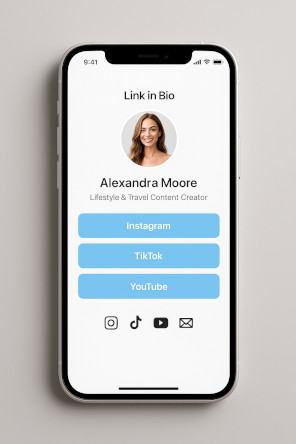
Influencer / Personal Brand
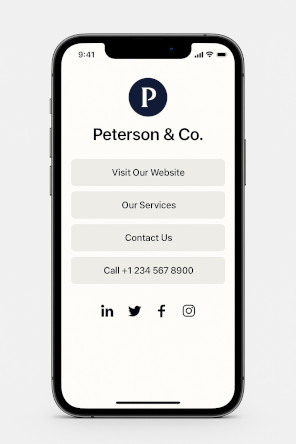
Business / Services
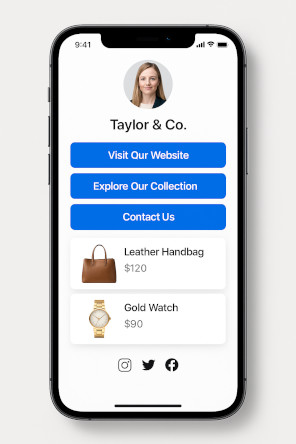
E-commerce / Products
💼 Plans & Pricing
Choose the plan that fits your needs — from basic usage to full-featured QR management.
🆓 Free
Essentials for simple QR creation
- 📅 Event QR
- 📶 QR Code for WIFI
- 👤 QR Code for vCard
- 🏦 QR Code Pix
- 📝 QR Code for Text
- ✅ QR Code Scanner
- 🔗 Link in Bio (1 link) NEW!
- ✅ Barcode Generator & Scanner
- ✅ Barcode Validator
- ❌ Email Support
- ❌ WhatsApp Support
Free *
⭐ Basic PRO
For branded QR Codes with your logo
- ✅ All Free features
- 🖼️ Add your logo to QR Codes
- 🎨 Color customization
- 🔗 QR Code for Link
- 🟢 QR Code for WhatsApp
- 🏆 QR Code for Google Review
- 📍 Location QR
- 🖼️ QR Code for Image
- 🎥 QR Code for Video
- 🎵 QR Code for Audio
- 📄 QR Code for PDF
- 🌐 Social Media QR
- 🛒 App Store & Play Store
- 🔗 Link in Bio (up to 3 links) NEW!
- 📊 Basic Link Analytics
- ❌ No dynamic QR or analytics
- 📧 Email Support (48h)
- 🟢 WhatsApp Support
-
📦 WhatsApp Blaster Add-on
Send segmented campaigns and mass messages via WhatsApp.
US$ 19/month – up to 1,000 messages/month.
✅ Add-on activated.
-
📦 Email Blaster Add-on
Send mass email campaigns with tracking and segmentation.
US$ 14/month – up to 5,000 emails/month.
✅ Add-on activated.
US$ 7 / month
or US$ 70 / year
💎 PRO
Full access to all advanced features
- ✅ All Basic PRO features
- 🛡️️ Google Review Booster NEW!
- 💼 vCard Plus
- 📈 Dynamic QR Codes
- 🔒 Protected QR Code
- 🎟️ Event Page with RSVP
- 🚀 Intelligent Conditional Redirects NEW!
- ✂️ Link Shortener
- 🔍 URL Checker
- 🐾 Pet Tag
- 📈 Analytics (Pro)
- 🔗 Link in Bio (unlimited links) NEW!
- 🌐 Custom Domain for Link in Bio
- 🚫 Remove “Powered by Code2Scan”
- 📊 Advanced Link Analytics & Reports
- 🔍 SEO Optimized Link in Bio
- ⚙️ API & Webhooks for automation
- 📧 Priority Email Support (24h)
- 🟢 WhatsApp Support – Priority
-
📦 WhatsApp Blaster Add-on
Send segmented campaigns and mass messages via WhatsApp.
US$ 29/month – up to 3,000 messages/month.
✅ Add-on activated.
-
📦 Email Blaster Add-on
Send mass email campaigns with tracking and segmentation.
US$ 19/month – up to 15,000 emails/month.
✅ Add-on activated.
US$ 16 / month
or US$ 160 / year
*Valid for 14 days
More about Link in Bio
Yes! You can create a free Link in Bio page with Code2Scan. Premium features such as advanced customization and analytics are available with a paid plan.
2. How many links can I add?
Free users can add up to 1 link. Basic PRO users can add up to 3 links. Full PRO users can add unlimited links, including social media icons and custom buttons.
3. Can I customize the Link in Bio page?
Yes! You can customize colors, background, fonts, and even upload your logo. With premium plans, you can also remove branding and use a custom domain.
4. Does it come with a QR Code?
Yes! Each Link in Bio page automatically generates a unique QR Code that you can print or share digitally to promote your page.
Can I track clicks on my Link in Bio page?
Yes! With our premium plans, you can track how many people click on each link and see statistics on page views.
Can I connect my own domain?
Yes! In premium plans, you can connect your custom domain or subdomain to your Link in Bio page for better branding.
Is the Link in Bio page mobile-friendly?
Absolutely! The Link in Bio pages generated by Code2Scan are fully responsive and optimized for smartphones and tablets.
Can I change my Link in Bio at any time?
Yes! You can edit your Link in Bio page whenever you want — add, remove, or reorder links instantly.
What kind of links can I add?
You can add any type of link: website, blog, social media, store, event, form, PDF, video, calendar, and more!
🚀 Ready to Create Your Link in Bio?
Start building your free Link in Bio page today and bring all your important links together in one place.
Create My Link in Bio