Lanzador de WhatsApp
Envía campañas segmentadas y mensajes masivos por WhatsApp a tus clientes. Llega a tu audiencia al instante con comunicación personalizada y compromiso en tiempo real.
📋 Registro de Mensajes por Contacto

🔐 Conecta tu WhatsApp
Escanea el código QR a continuación para activar tu sesión:
Después de escanear, este paso se ocultará automáticamente.
🔌 Desconectar WhatsApp
Estás conectado. Haz clic abajo para desconectar:
Esto cerrará tu sesión y te permitirá conectar otro número.
Cómo usar WhatsApp Blaster para mensajes masivos
Paso 1: Prepara tu lista de contactos
Crea un archivo CSV con los contactos a los que deseas enviar mensajes. Asegúrate de incluir las columnas Nombre y Teléfono en formato internacional (por ejemplo, +5491123456789). Puedes exportarlo desde un CRM, hoja de cálculo o recolectarlos manualmente.

Paso 2: Personaliza tu mensaje
Escribe un mensaje personalizado usando variables dinámicas como {{name}} y {{phone}}. También puedes añadir variaciones con el formato spintax {opción1|opción2|opción3} — se elegirá una opción al azar para cada mensaje. Se admiten saltos de línea, emojis y formato de WhatsApp. Opcional: crea varias plantillas completas separándolas con || (se elegirá una al azar).

Paso 3: Escanea el código QR
Para comenzar el envío, conecta tu cuenta de WhatsApp escaneando el código QR que aparece en pantalla. Esto vincula tu sesión de forma segura con nuestro sistema — no necesitas credenciales.

Paso 4: Configura opciones avanzadas
Asigna a tu campaña un nombre para facilitar el seguimiento. Establece un retraso en segundos entre los mensajes (recomendado: 5–15s) para evitar la detección de spam. Opcionalmente, elige una fecha y hora programadas para iniciar la campaña automáticamente. También puedes seleccionar los días de la semana permitidos, configurar tu zona horaria y definir ventanas de envío para que los mensajes se envíen solo en horas específicas.

Paso 5: Envía un mensaje de prueba
Utiliza la función de prueba para enviar el mensaje a tu propio número de WhatsApp y ver cómo se verá. Es la mejor forma de validar formato, personalización y enlaces antes de lanzar.

Paso 6: Vista previa en tiempo real
Mientras escribes tu mensaje con variables como {{name}} o {{phone}}, la vista previa se actualiza en tiempo real mostrando cómo aparecerá en WhatsApp, incluyendo emojis y formato.

Paso 7: Inicia tu campaña
Haz clic en Iniciar y los mensajes se enviarán automáticamente uno por uno. Nuestro sistema respeta las políticas anti-spam de WhatsApp usando control de tiempo y segmentación inteligente.

Paso 8: Supervisa el historial de entregas
Después del envío, revisa el historial en tu panel. Verás el estado de cada mensaje: ✔ Enviado, ⏳ Pendiente o ❌ Fallido, con hora, número y contenido.

Envía mensajes masivos por WhatsApp con texto personalizado, programación y automatización
WhatsApp Blaster de Code2Scan es la mejor herramienta para enviar mensajes personalizados por WhatsApp a gran escala. Perfecta para marketing, atención al cliente, recordatorios o promociones.
Envío masivo por WhatsApp sin API
Envía mensajes por WhatsApp en masa sin necesidad de integrar una API. Usa autenticación por código QR y una lista CSV. No requiere configuración técnica.
Campañas personalizadas con variables
Utiliza campos dinámicos como {{name}} y {{phone}} para personalizar cada mensaje. Agrega emojis, enlaces y formato. Ideal para ventas automatizadas.
Programación y control de intervalo
Controla el tiempo entre mensajes para evitar filtros de spam. Programa envíos para fechas y horarios específicos. Ideal para campañas diarias o recurrentes.
Ideal para agencias, negocios y soporte
Usado por agencias digitales, negocios locales y comercios para automatizar comunicaciones. Aumenta conversiones, reduce el trabajo manual y mide resultados.
Puedes enviar mensajes de prueba, monitorear el estado (enviado, fallido, pendiente) y acceder a registros detallados. Administra múltiples campañas al mismo tiempo. No requiere instalación.
Prueba ahora la mejor herramienta para envíos masivos por WhatsApp. Crea tu campaña, sube tu lista y comienza en minutos.
🚀 Principales funciones de WhatsApp Blaster
📤 Envío Masivo
Envía mensajes personalizados a cientos o miles de contactos con una lista CSV simple.
✍️ Personalización del Mensaje
Usa variables como {{name}} y {{phone}} para personalizar automáticamente cada mensaje.
🧪 Mensaje de Prueba
Visualiza tu mensaje antes del envío probándolo directamente en tu número de WhatsApp.
⏱️ Control de Intervalo
Define el intervalo entre mensajes para evitar detección de spam y mejorar la tasa de entrega.
📅 Programación de Campañas
Programa la fecha y hora de inicio de la campaña automáticamente, incluso si estás desconectado.
📊 Registros y Estadísticas
Monitorea el estado de cada mensaje: enviado, fallido o pendiente — con historial detallado e insights.
Casos reales de uso de WhatsApp Blaster

📢 Campañas de Marketing
Las empresas utilizan WhatsApp Blaster para enviar promociones, lanzamientos, cupones y campañas estacionales directamente a sus clientes.

📆 Recordatorios de Citas
Clínicas, salones y prestadores de servicios envían recordatorios automáticos para reducir ausencias.

🛠️ Soporte al Cliente
Negocios envían mensajes de soporte proactivo, pasos de onboarding o actualizaciones por WhatsApp.

🎉 Invitaciones a Eventos
Organizadores envían invitaciones, confirmaciones y actualizaciones a participantes de eventos, talleres y webinars.
📲 Ejemplos de Campañas por WhatsApp
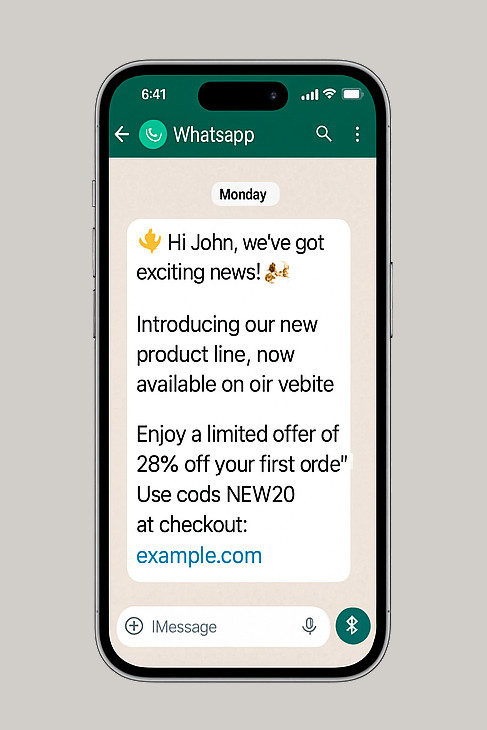
Lanzamiento de Producto / Promoción
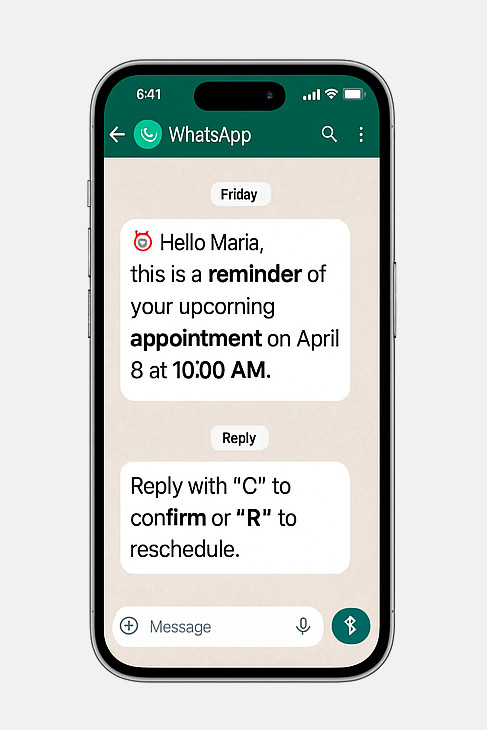
Recordatorio de Cita / Servicio
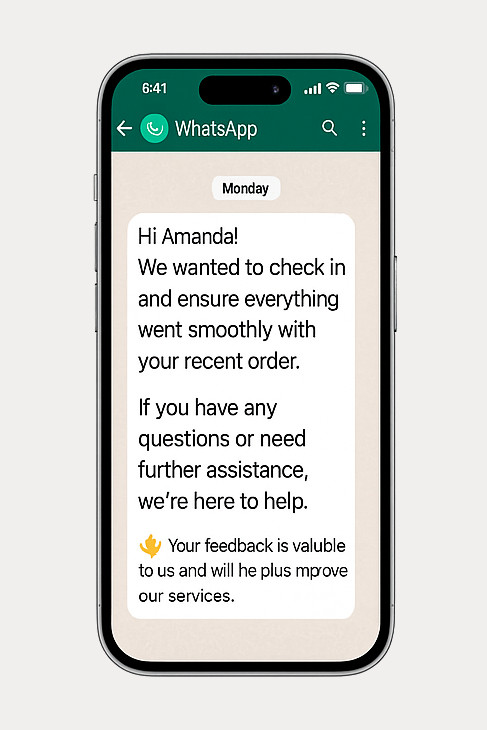
Soporte al Cliente / Seguimiento
💼 Planes y Precios
Elige el plan que se adapta a tus necesidades — desde uso básico hasta gestión completa de QR.
🆓 Gratis
Esencial para creación simple de QR Codes
- 📅 QR de Evento
- 📶 Código QR para Wi-Fi
- 👤 Código QR para vCard
- 🏦 Código QR Pix
- 📝 QR Code for Text
- ✅ Lector de QR Code
- 🔗 Link en la Bio (1 enlace) NEW!
- ✅ Generador y Lector de Códigos de Barras
- ✅ Validador de Códigos de Barras
- ❌ Soporte por Correo Electrónico
- ❌ Soporte por WhatsApp
Gratis *
⭐ Básico PRO
Para QR Codes personalizados con tu logo
- ✅ Todas las funciones del plan Gratuito
- 🖼️ Agrega tu logo a los QR Codes
- 🎨 Personalización de Colores
- 🔗 QR Code for Link
- 🟢 Código QR para WhatsApp
- 🏆 QR Code for Google Review
- 📍 QR de Ubicación
- 🖼️ Código QR para Imagen
- 🎥 Código QR para Video
- 🎵 Código QR para Audio
- 📄 Código QR para PDF
- 🌐 QR de Redes Sociales
- 🛒 App Store & Play Store
- 🔗 Link en la Bio (hasta 3 enlaces) NEW!
- 📊 Análisis básico de enlaces
- ❌ Sin QR Dinámico ni Analytics
- 📧 Soporte por Correo (48h)
- 🟢 Soporte por WhatsApp
-
📦 Complemento de Envíos por WhatsApp
Envía campañas segmentadas y mensajes masivos por WhatsApp.
US$ 19/mes – hasta 1.000 mensajes/mes.
✅ Complemento activado.
-
📦 Complemento de Envíos por Correo Electrónico
Envía campañas masivas de correo electrónico con seguimiento y segmentación.
US$ 14/mes – hasta 5.000 correos/mes.
✅ Complemento activado.
US$ 7 / mes
or US$ 70 / año
💎 PRO
Acceso completo a todas las funciones avanzadas
- ✅ Todas las funciones de PRO Básico
- 🛡️️ Google Review Booster NEW!
- 💼 vCard Plus
- 📈 QR Codes Dinámicos
- 🔒 Código QR Protegido
- 🎟️ Página de Evento con RSVP
- 🚀 Redireccionamientos Inteligentes Condicionales NEW!
- ✂️ Acortador de Enlaces
- 🔍 Verificador de URL
- 🐾 Pet Tag
- 📈 Analytics (Pro)
- 🔗 Link en la Bio (enlaces ilimitados) NEW!
- 🌐 Dominio personalizado para Link en la Bio
- 🚫 Eliminar “Powered by Code2Scan”
- 📊 Análisis avanzado de enlaces e informes
- 🔍 Link en la Bio optimizado para SEO
- ⚙️ API y Webhooks para automatización
- 📧 Soporte Prioritario por Correo (24h)
- 🟢 Soporte por WhatsApp – Prioritario
-
📦 Complemento de Envíos por WhatsApp
Envía campañas segmentadas y mensajes masivos por WhatsApp.
US$ 29/mes – hasta 3.000 mensajes/mes.
✅ Complemento activado.
-
📦 Complemento de Envíos por Correo Electrónico
Envía campañas masivas de correo electrónico con seguimiento y segmentación.
US$ 19/mes – hasta 15.000 correos/mes.
✅ Complemento activado.
US$ 16 / mes
or US$ 160 / año
*Válido por 14 días
Más sobre WhatsApp Blaster
No. WhatsApp Blaster funciona sin API. Solo escanea el código QR desde tu cuenta de WhatsApp normal.
2. ¿Hay una versión gratuita?
No. WhatsApp Blaster es una función de pago. Debes actualizar a un plan PRO para usar campañas masivas.
3. ¿Es seguro y privado?
Sí. Tus contactos y mensajes son procesados de forma segura. Tu sesión de WhatsApp es privada y encriptada.
4. ¿Cuántos mensajes puedo enviar?
Depende del plan. Los usuarios PRO tienen mayores límites y controles avanzados para campañas y automatización.
¿Puedo programar campañas con anticipación?
Sí. Puedes definir la fecha y hora de inicio y el sistema enviará automáticamente.
¿Puedo rastrear la entrega de mensajes?
Sí. Cada mensaje tiene un historial con estado, hora y número.
¿Puedo probar mensajes antes de enviarlos?
Claro. Puedes enviar una vista previa a tu número y validar formato, enlaces y personalización.
¿Puedo incluir emojis y saltos de línea?
Sí. El editor admite emojis, texto en negrita, saltos de línea y más.
¿Puedo usar variables en el mensaje?
Sí. Usa {{name}} y {{phone}} para personalizar dinámicamente.
📣 ¿Listo para lanzar tu campaña de WhatsApp?
Comienza a enviar mensajes personalizados con nuestra potente herramienta WhatsApp Blaster. Mejora tu comunicación ahora.