WhatsApp-Blaster
Senden Sie segmentierte Kampagnen und Massenmitteilungen per WhatsApp an Ihre Kunden. Erreichen Sie Ihr Publikum sofort mit personalisierter Kommunikation und Interaktion in Echtzeit.
📋 Nachrichtenprotokoll nach Kontakt

🔐 Verbinde dein WhatsApp
Scannen Sie den QR-Code unten, um Ihre Sitzung zu aktivieren:
Nach dem Scannen wird dieser Schritt automatisch ausgeblendet.
🔌 WhatsApp trennen
Sie sind verbunden. Klicken Sie unten, um die Verbindung zu trennen:
Dadurch werden Sie abgemeldet und können eine andere Nummer verbinden.
So verwenden Sie WhatsApp Blaster für Massenversand
Schritt 1: Bereiten Sie Ihre Kontaktliste vor
Erstellen Sie eine CSV-Datei mit den Kontakten, die Sie anschreiben möchten. Sie muss die Spalten Name und Telefonnummer im internationalen Format enthalten (z. B. +4915112345678).

Schritt 2: Nachricht personalisieren
Schreiben Sie eine personalisierte Nachricht mit dynamischen Variablen wie {{name}} und {{phone}}. Sie können auch Variationen im Spintax-Format {Option1|Option2|Option3} hinzufügen – eine Option wird für jede Nachricht zufällig ausgewählt. Zeilenumbrüche, Emojis und WhatsApp-Formatierungen werden unterstützt. Optional: Erstellen Sie mehrere vollständige Vorlagen, indem Sie sie mit || trennen (eine wird zufällig ausgewählt).

Schritt 3: QR-Code scannen
Scannen Sie den angezeigten QR-Code, um Ihr WhatsApp-Konto zu verbinden. Ihre Sitzung wird sicher verknüpft – ohne Zugangsdaten.

Schritt 4: Erweiterte Optionen konfigurieren
Geben Sie Ihrer Kampagne einen Namen, um die Nachverfolgung zu erleichtern. Legen Sie eine Verzögerung in Sekunden zwischen den Nachrichten fest (empfohlen: 5–15 s), um Spam-Erkennung zu vermeiden. Optional können Sie ein geplantes Datum und eine Uhrzeit festlegen, um die Kampagne automatisch zu starten. Sie können auch die erlaubten Wochentage auswählen, Ihre Zeitzone festlegen und Sendezeitfenster definieren, damit Nachrichten nur zu bestimmten Zeiten gesendet werden.

Schritt 5: Senden Sie eine Testnachricht
Verwenden Sie die Testfunktion, um eine Vorschau-Nachricht an Ihre eigene Nummer zu senden. So prüfen Sie Format, Links und Personalisierung vor dem Start.

Schritt 6: Vorschau in Echtzeit
Während Sie Ihre Nachricht eingeben, zeigt die rechte Seite eine Live-Vorschau mit Variablen, Emojis und Formatierungen.

Schritt 7: Kampagne starten
Klicken Sie auf Start, und die Nachrichten werden nacheinander versendet. Unsere Lösung berücksichtigt Anti-Spam-Regeln von WhatsApp mit Zeitverzögerungen.

Schritt 8: Versandstatus überwachen
Beobachten Sie den Status im Dashboard: ✔ Gesendet, ⏳ Ausstehend oder ❌ Fehlgeschlagen – mit Zeitstempel und Details.

Versenden Sie Massen-Nachrichten via WhatsApp – mit Personalisierung, Zeitsteuerung und Automatisierung
WhatsApp Blaster von Code2Scan ist das ideale Tool, um personalisierte WhatsApp-Nachrichten in großen Mengen zu versenden. Perfekt für Marketing, Kundenservice, Termin-Erinnerungen und mehr.
Massenversand per WhatsApp ohne API
Versenden Sie Nachrichten ohne API-Integration. Die Authentifizierung erfolgt über eine WhatsApp-Web-Session und CSV-Kontaktlisten.
Personalisierte Kampagnen mit Variablen
Nutzen Sie {{name}} und {{phone}} zur individuellen Anpassung jeder Nachricht mit Emojis, Links und Formatierung.
Zeitgesteuerter Versand mit Verzögerungskontrolle
Legen Sie Verzögerungen fest, um Spamfilter zu vermeiden, und planen Sie Kampagnen zu bestimmten Zeitpunkten.
Ideal für Agenturen, Unternehmen und Support
Agenturen, lokale Unternehmen und E-Commerce nutzen WhatsApp Blaster für automatisierte Kommunikation mit Logs und Dashboards.
Senden Sie Testnachrichten, verfolgen Sie Status (gesendet, fehlgeschlagen, ausstehend) und verwalten Sie mehrere Kampagnen – ohne Installation.
Jetzt WhatsApp Blaster testen – Kampagne erstellen, Kontakte hochladen und in wenigen Minuten starten.
🚀 Hauptfunktionen von WhatsApp Blaster
📤 Massenversand
Senden Sie Nachrichten an Hunderte oder Tausende Empfänger mit nur einer CSV-Datei.
✍️ Personalisierte Nachrichten
Nutzen Sie Platzhalter wie {{name}} und {{phone}}, um jede Nachricht individuell zu gestalten.
🧪 Testnachricht
Testen Sie Ihre Nachricht vorab, indem Sie sie an Ihre eigene Nummer senden.
⏱️ Zeitverzögerung
Steuern Sie die Intervalle zwischen den Nachrichten, um Blockierungen zu vermeiden.
📅 Zeitplanung
Starten Sie Kampagnen automatisch zu einem festgelegten Datum und Uhrzeit.
📊 Versandprotokolle & Statistiken
Sehen Sie den Status jeder Nachricht – gesendet, fehlgeschlagen oder ausstehend – mit detaillierten Informationen.
Anwendungsbeispiele für WhatsApp Blaster

📢 Marketingkampagnen
Versenden Sie Produkt-Launches, Angebote, Gutscheine oder saisonale Aktionen direkt an Ihre Kundschaft.

📆 Termin-Erinnerungen
Praxen, Salons und Dienstleister senden automatische Erinnerungen, um No-Shows zu reduzieren.

🛠️ Kundenservice
Senden Sie automatisierte Support-Updates, Onboarding-Nachrichten oder Serviceinformationen.

🎉 Veranstaltungs-Einladungen
Veranstalter verschicken Einladungen, Bestätigungen und Updates für Events, Workshops oder Webinare per WhatsApp.
📲 Beispielhafte WhatsApp-Kampagnen
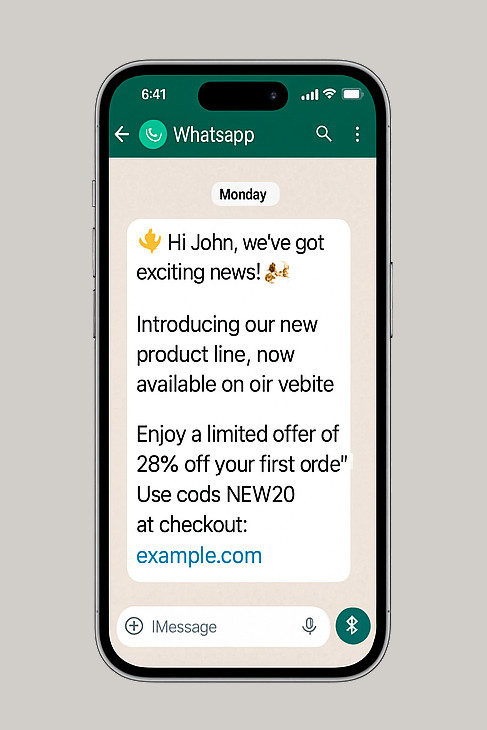
Produkt-Launch / Promo
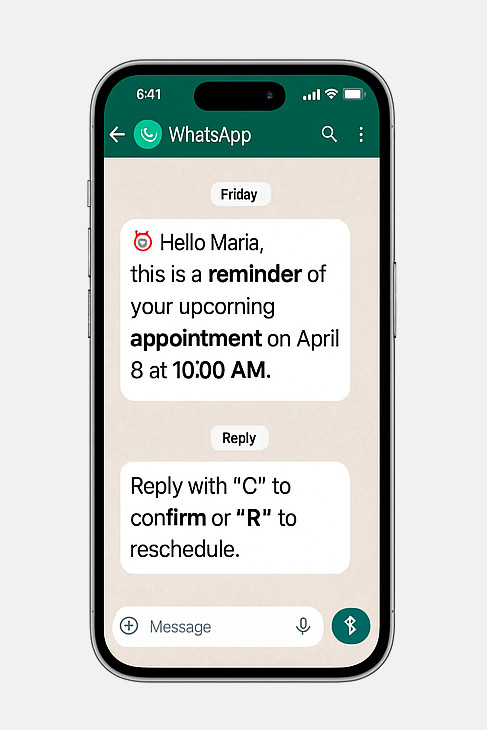
Termin-Erinnerung / Serviceprozess
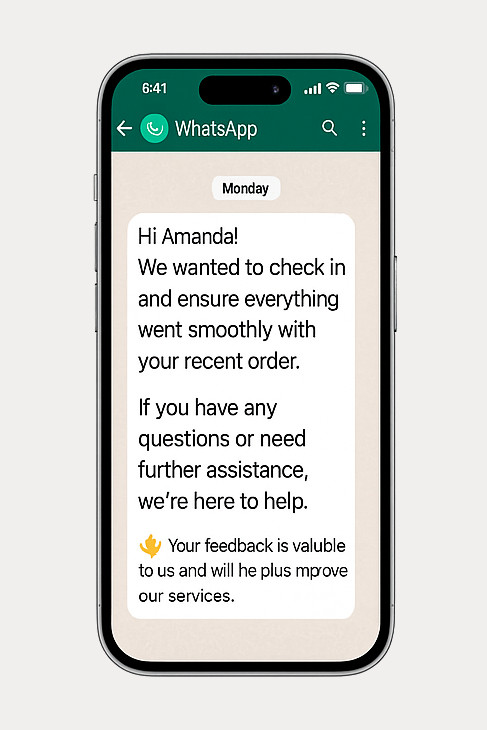
Kundensupport / Follow-up
💼 Pläne und Preise
Wählen Sie den Plan, der Ihren Anforderungen entspricht — von einfacher Nutzung bis vollständiger QR-Code-Verwaltung.
🆓 Kostenlos
Essentials für einfache QR-Erstellung
- 📅 Event QR
- 📶 QR-Code für WLAN
- 👤 QR-Code für vCard
- 🏦 QR-Code-Pix
- 📝 QR Code for Text
- ✅ QR-Code-Scanner
- 🔗 Link in Bio (1 Link) NEW!
- ✅ Barcode-Generator & Scanner
- ✅ Barcode-Validator
- ❌ E-Mail-Support
- ❌ WhatsApp-Support
Kostenlos *
⭐ Basic PRO
Für QR-Codes mit Ihrem Logo
- ✅ Alle kostenlosen Funktionen
- 🖼️ Fügen Sie Ihr Logo zu QR-Codes hinzu
- 🎨 Farbpersonalisierung
- 🔗 QR Code for Link
- 🟢 QR-Code für WhatsApp
- 🏆 QR Code for Google Review
- 📍 Standort QR
- 🖼️ QR-Code für Bild
- 🎥 QR-Code für Video
- 🎵 QR-Code für Audio
- 📄 QR-Code für PDF
- 🌐 Social Media QR
- 🛒 App Store & Play Store
- 🔗 Link in Bio (bis zu 3 Links) NEW!
- 📊 Basis-Link-Analyse
- ❌ Keine dynamischen QR oder Analytics
- 📧 E-Mail-Support (48h)
- 🟢 WhatsApp-Support
-
📦 WhatsApp-Blaster-Add-on
Senden Sie segmentierte Kampagnen und Massen-Nachrichten über WhatsApp.
19 USD/Monat – bis zu 1.000 Nachrichten/Monat.
✅ Add-on aktiviert.
-
📦 E-Mail-Blaster-Add-on
Senden Sie Massen-E-Mail-Kampagnen mit Tracking und Segmentierung.
14 USD/Monat – bis zu 5.000 E-Mails/Monat.
✅ Add-on aktiviert.
US$ 7 / Monat
or US$ 70 / Jahr
💎 PRO
Voller Zugriff auf alle erweiterten Funktionen
- ✅ Alle Funktionen von Basic PRO
- 🛡️️ Google Review Booster NEW!
- 💼 vCard Plus
- 📈 Dynamische QR-Codes
- 🔒 Geschützter QR-Code
- 🎟️ Eventseite mit RSVP
- 🚀 Intelligente Bedingte Weiterleitungen NEW!
- ✂️ Linkverkürzer
- 🔍 URL-Checker
- 🐾 Pet Tag
- 📈 Analytics (Pro)
- 🔗 Link in Bio (unbegrenzte Links) NEW!
- 🌐 Benutzerdefinierte Domain für Link in Bio
- 🚫 „Powered by Code2Scan“ entfernen
- 📊 Erweiterte Link-Analyse und Berichte
- 🔍 SEO-optimierter Link in Bio
- ⚙️ API & Webhooks zur Automatisierung
- 📧 Priorisierter E-Mail-Support (24h)
- 🟢 WhatsApp-Support – Priorität
-
📦 WhatsApp-Blaster-Add-on
Senden Sie segmentierte Kampagnen und Massen-Nachrichten über WhatsApp.
29 USD/Monat – bis zu 3.000 Nachrichten/Monat.
✅ Add-on aktiviert.
-
📦 E-Mail-Blaster-Add-on
Senden Sie Massen-E-Mail-Kampagnen mit Tracking und Segmentierung.
19 USD/Monat – bis zu 15.000 E-Mails/Monat.
✅ Add-on aktiviert.
US$ 16 / Monat
or US$ 160 / Jahr
*Gültig für 14 Tage
Mehr über WhatsApp Blaster
Nein. WhatsApp Blaster funktioniert ohne API. Authentifizieren Sie sich einfach per QR-Code.
2. Gibt es eine kostenlose Version?
Nein. WhatsApp Blaster ist ein kostenpflichtiges Feature. Für den Massenversand benötigen Sie einen PRO-Plan.
3. Ist es sicher und privat?
Ja. Alle Daten bleiben verschlüsselt und werden nicht an Dritte weitergegeben.
4. Wie viele Nachrichten kann ich senden?
Das hängt vom gewählten Plan ab. PRO-Nutzer haben höhere Limits und mehr Optionen.
Kann ich Kampagnen im Voraus planen?
Ja. Sie können Datum und Uhrzeit für den Kampagnenstart definieren.
Kann ich den Versandstatus überwachen?
Ja. Für jede Nachricht sehen Sie, ob sie gesendet, fehlgeschlagen oder noch ausstehend ist.
Kann ich Nachrichten vor dem Versand testen?
Natürlich. Testen Sie Ihre Nachricht mit Ihrem eigenen WhatsApp-Konto.
Kann ich Emojis und Zeilenumbrüche verwenden?
Ja. Der Editor unterstützt Emojis, Fett- und Kursivschrift sowie Zeilenumbrüche.
Kann ich Variablen im Text nutzen?
Ja. Nutzen Sie {{name}} und {{phone}}, um jede Nachricht individuell anzupassen.
📣 Bereit, Ihre WhatsApp-Kampagne zu starten?
Senden Sie jetzt personalisierte Nachrichten mit WhatsApp Blaster und verbessern Sie Ihre Kommunikation.